

In this step-by-step guide, “How to Troubleshoot a Vacuum Cleaner That Won’t Turn On?”, we provide essential troubleshooting techniques to help you diagnose and fix common problems that may prevent your vacuum cleaner from functioning. Whether you’re dealing with a power issue, a clogged filter, or a faulty switch, this guide aims to empower users with the knowledge to resolve these issues quickly and effectively. By following the outlined steps, you can get your vacuum cleaner back in working order, ensuring it operates efficiently and meets your cleaning needs.


Check if the vacuum cleaner is plugged into a functioning outlet. Inspect the power cord and ensure it is securely connected. If unsure, unplug the vacuum and plug it back in firmly. Next, take a moment to test the outlet’s functionality by plugging in another device, like a lamp or a phone charger, to see if it powers on. If the other device works, your outlet is functioning properly. If it doesn’t, you might have a dead outlet that needs attention.
Investigate further by checking your circuit breaker. Locate your breaker panel, which is often found in basements, garages, or utility rooms. Open the panel and look for any tripped breakers, which will typically be in the “off” position or in a different color than the others. If you find one, simply flip it back to the “on” position. Alternatively, if you have a fuse box, check for any blown fuses and replace them as necessary. Once you’ve taken these steps, try plugging in your vacuum cleaner again to see if it powers up.


Inspect the Power Cord
Examine the power cord thoroughly for any visible signs of damage. Look for fraying, cuts, or any exposed wires that could pose a risk. Pay close attention to areas near the plug and where the cord bends. If you notice any damage, take it seriously. A damaged power cord can lead to electrical shocks or fire hazards. Make sure to inspect the entire length of the cord, from the plug to the vacuum’s connection point, ensuring that you do not overlook any small imperfections.
Replace the power cord if you find any damage. Do not attempt to use the vacuum until the cord is either repaired or replaced. Unplug the vacuum from the outlet immediately to prevent any accidents. If you are not familiar with electrical repairs, consider seeking professional help or purchasing a new power cord designed for your specific vacuum model. Always prioritize safety over convenience when it comes to potential electrical hazards.
Check the On/Off Switch
Inspect the on/off switch by pressing it several times to check if it responds correctly. Ensure that you feel a distinct click with each press, indicating that the switch is functioning. If the switch feels stuck or unresponsive, it may be a sign that it requires cleaning or replacement. Carefully examine the area around the switch for any visible debris or dirt that could be obstructing it. If you notice anything, use a soft cloth or a small brush to gently clean around the switch, making sure to avoid forcing anything into the opening.
Test the switch again after cleaning to see if the functionality has improved. If it still feels unresponsive, consider removing the switch if possible, following the manufacturer’s instructions. Check for any dirt or buildup inside the switch mechanism itself. If cleaning does not resolve the issue, you may need to replace the switch entirely. Ensure you have the right replacement part that matches your device’s specifications before proceeding. This will help maintain the longevity and proper function of your equipment.
Examine the Filter and Bag
Inspect the filter and bag regularly to ensure your vacuum operates efficiently. Start by turning off and unplugging the vacuum for safety. Locate the filter, which is usually found near the motor or at the back of the vacuum. Remove the filter carefully and check for any visible dirt or debris. If the filter appears clogged, gently tap it against a hard surface to dislodge any trapped particles. Rinse the filter under warm water if it’s washable, allowing it to dry completely before reinserting it. If the filter is damaged or excessively dirty, replace it with a new one to maintain optimal performance.
Examine the vacuum bag if your model uses one. Open the bag compartment and take out the bag, checking for signs of fullness. If the bag feels heavy or appears to be more than halfway full, replace it with a new one. Dispose of the old bag properly to prevent dust and allergens from escaping. Ensure the new bag is securely fitted in the compartment before closing it. Regularly replace or clean these components every few months or sooner if you notice a drop in suction power. Taking these simple steps can significantly enhance your vacuum’s efficiency and prolong its lifespan.
Consult the User Manual
Consult the user manual for your vacuum cleaner model to find specific troubleshooting tips. Look for the section that addresses power issues, as this will often contain a list of common problems and solutions. Check for any diagrams or flowcharts that outline steps to diagnose the issue. Follow the instructions carefully, paying attention to any model-specific nuances that may not apply to other vacuums. Make sure you have the manual handy, as it will serve as a guide to help you navigate through the troubleshooting process effectively.
Review any warning signs or indicators mentioned in the manual that may help identify the problem. If your vacuum has a reset button, locate it in the manual and follow the steps to reset the machine. Look for information on checking the power cord and plug for damage, as well as verifying that any filters or hoses are not clogged. If the manual suggests specific parts that may need replacement, consider ordering those components directly from the manufacturer. Engaging with the user manual can provide you with tailored insights, ensuring you take the right steps to get your vacuum up and running again.
Final Steps to Resolution
In conclusion, troubleshooting a vacuum cleaner that won’t turn on can often be a straightforward process if you follow the right steps. By checking the power source, inspecting the cord, and ensuring all components are functioning properly, you can identify and resolve many common issues. Remember, regular maintenance and prompt attention to any problems will help extend the life of your vacuum and keep it performing at its best. With a little patience and care, you can ensure your cleaning companion is always ready to tackle dirt and dust!
Essential Equipment Needed
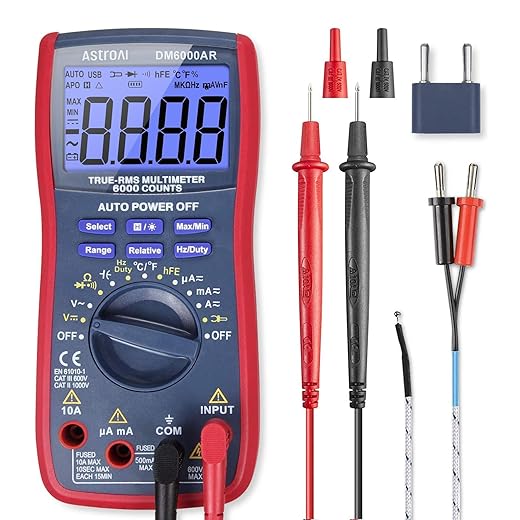
Quick Solutions
Step-by-Step Guide to Troubleshooting and Fixing Common Vacuum Cleaner Issues
- Identify the Problem: Start by observing your vacuum. Is it making unusual noises, losing suction, or not turning on? Take notes on what issues you’re experiencing, as this will help you narrow down potential fixes
- Gather Basic Tools: Before diving into repairs, assemble a basic toolkit. You’ll typically need a screwdriver (often Phillips and flathead), a pair of pliers, and possibly a multimeter for electrical issues. Having these handy will make your repair process smoother
- Consult the Manual: If you have the manual for your vacuum cleaner, refer to it! It often contains troubleshooting sections and diagrams that can guide you through disassembly and reassembly
- Clean and Inspect: Sometimes, a simple cleaning can solve the problem. Check for blockages in hoses, filters, and brushes. Clean or replace filters and remove any debris that may be obstructing airflow
- Watch Tutorials: There are plenty of helpful video tutorials available online that can walk you through specific repairs. Search for your vacuum cleaner model alongside the issue you’re facing for targeted guidance
- Remember, repairing your vacuum cleaner can be a rewarding experience, and with a bit of patience, you’ll likely find the solution! Happy fixing!
Common Questions About Vacuum Cleaner Repair
Disposing of a vacuum cleaner that is beyond repair can be done in several environmentally friendly ways. Here are the steps you should follow:
- Check Local Regulations: Before disposing of your vacuum cleaner, check your local waste disposal regulations. Some areas have specific guidelines for electronic waste.
- Recycling Options: Many vacuum cleaners contain materials that can be recycled. Look for local recycling centers that accept small appliances or electronics. Some retailers also offer recycling programs for appliances.
- Donate If Possible: If the vacuum cleaner still functions in some capacity, consider donating it to a charity, thrift store, or local community center. They might be able to use it or repair it.
- Scrap Metal: If your vacuum cleaner is made primarily of metal, you might be able to take it to a scrap metal yard. They can recycle the metal parts, reducing waste.
- Landfill: If none of the above options are available, you may have to dispose of it in your regular trash. However, this should be a last resort due to the environmental impact.
Remember, proper disposal helps reduce waste and promotes recycling, so always try to find the most eco-friendly option available to you!

Thanks for your comment! If you’ve already checked the power source and cord, you might want to look at the fuse or circuit breaker in your home. Sometimes, they can trip and prevent the vacuum from getting power. Let us know how it goes!
Just wanted to share my success story! I had a similar issue with my Dyson V11. After checking the power cord, I found a small kink that was causing the problem. I fixed it, and now it works like a charm! Thanks for the tips!
That’s awesome to hear! It’s amazing how a small issue can cause such big problems. Thanks for sharing your experience, and happy cleaning!
I don’t know, I think some vacuums are just built to fail. My Hoover keeps breaking down and I feel like I’m just wasting money on repairs. Anyone else feel the same?
It can be really frustrating when a product doesn’t hold up! Some vacuums have better reputations than others. Have you thought about looking into brands that are known for their durability? Let’s hear what others think too!
Hey, great guide! I followed the steps but still can’t get my Shark Navigator to turn on. Any specific recommendations on what else I can try? Should I check the fuse or something? Thanks!
I tried to check the on/off switch, but it seems stuck. Any tips on how to unstick it? I’m worried I might break it if I force it. Help!
It sounds like you’re dealing with a tricky situation! Try gently wiggling the switch back and forth without applying too much pressure. Sometimes, dust can build up and cause it to stick. If that doesn’t work, consider reaching out to the manufacturer for further guidance!